CodexTools

A standalone desktop manager for Codex setup, launch, connection modes, UI enhancements, scripts, diagnostics, and repair workflows.

一个独立桌面管理器,用来集中处理 Codex 安装配置、启动、连接模式、界面增强、脚本、诊断和修复流程。

A clearer control center for running Codex locally.

CodexTools packages the Go backend, desktop launcher, React manager, relay tools, repair actions, and user-facing enhancements into one project. The interface is built for people who want to start Codex, pick a connection mode, fix common problems, and keep useful page tools available without editing config files by hand.

一个更清楚的本地 Codex 控制中心。

CodexTools 把 Go 后端、桌面启动器、React 管理界面、中转工具、修复动作和常用页面增强集中到一个项目里。普通用户可以直接启动 Codex、选择连接模式、处理常见问题,不需要手动编辑本地配置文件。

Repository contents

main.go              entry point
manager.go           HTTP manager + commands
launcher.go          silent launcher
helper.go            helper server + relay proxy
bridge.go            CDP bridge injection
settings.go          settings + dist lookup
relay.go             relay configuration
repair.go            repair + provider sync
scripts.go           user scripts + market
entrypoints.go       desktop entries + watcher
diagnostics.go       logs + support reports
types.go/util.go     shared structures + helpers
web/                 React + Vite UI
docs/                GitHub Pages assets

仓库内容结构

main.go              程序入口
manager.go           HTTP 管理器与命令分发
launcher.go          静默启动器
helper.go            helper 服务与中转代理
bridge.go            CDP 桥接注入
settings.go          设置与前端产物查找
relay.go             中转配置
repair.go            修复与 Provider 同步
scripts.go           用户脚本与脚本市场
entrypoints.go       桌面入口与 watcher
diagnostics.go       日志与诊断报告
types.go/util.go     共享结构与工具函数
web/                 React + Vite 前端
docs/                GitHub Pages 资源

Standalone structure

The web UI lives in `web/`, while the Go backend is split by manager, launcher, relay, bridge, repair, scripts, diagnostics, and shared helpers. Release builds still use one `package main` for simple desktop packaging.

独立结构

前端在 `web/`,Go 后端按管理器、启动器、中转、桥接、修复、脚本、诊断和共享工具拆分。发布构建仍保留同一个 `package main`,便于桌面包继续使用现有构建方式。

Practical UI

The first screen prioritizes launch, connection, health checks, and repair actions instead of exposing every setting up front.

实用界面

首页优先展示启动、连接、状态检查和修复入口,而不是一开始就把所有设置堆出来。

Operations built in

Relay setup, script market operations, diagnostics, logs, and legacy conversation repair remain available inside one manager.

运维能力内置

Relay 配置、脚本市场、诊断报告、日志和旧对话修复都保留在同一个管理器中。

Manager screenshots

The desktop manager is organized around everyday actions: start Codex, confirm connection mode, finish first-run setup, and keep page enhancements visible without editing local files by hand.

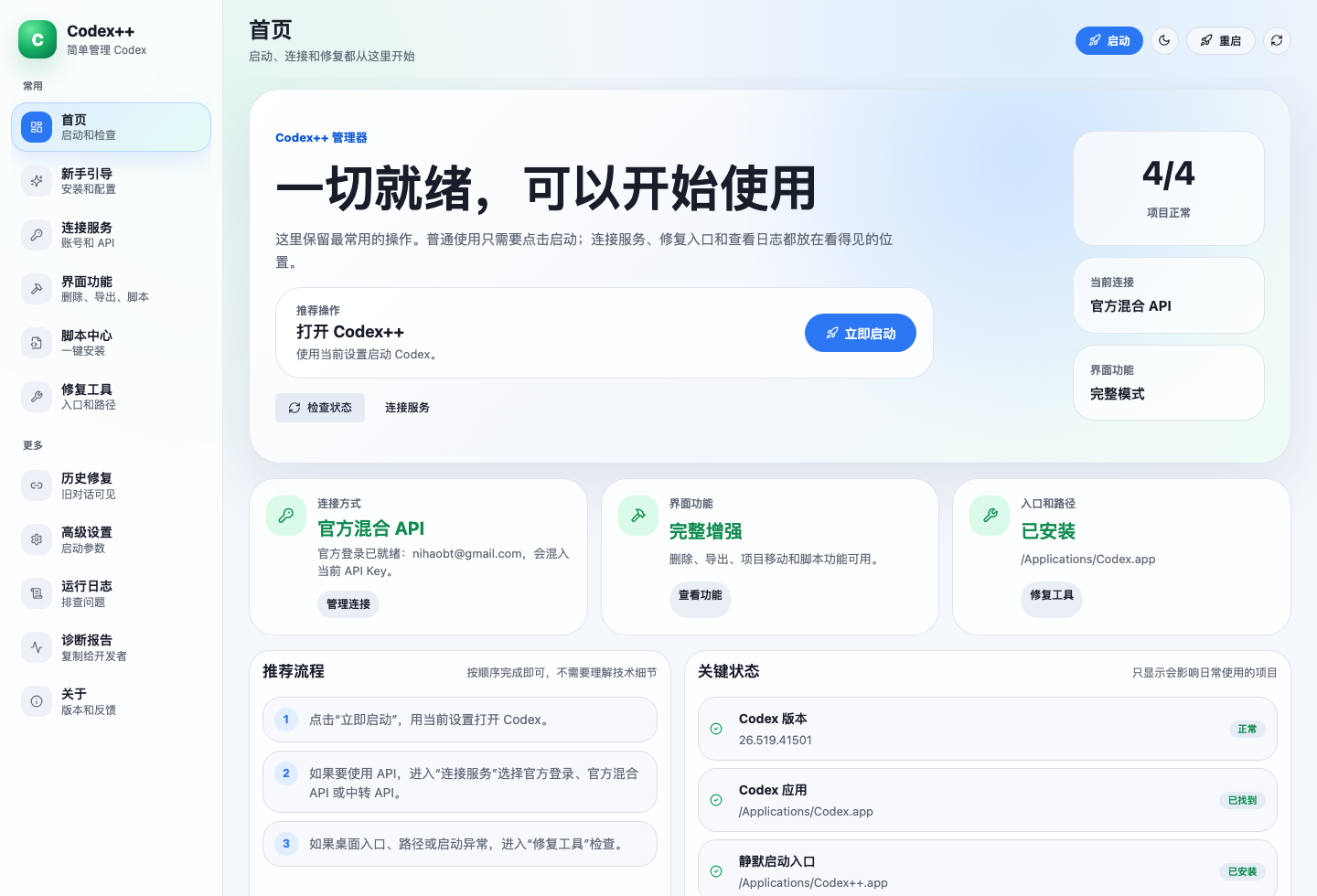
CodexTools home dashboard showing launch status, connection mode, UI enhancement mode, and repair entry points

Home dashboard

The first screen shows whether the local setup is ready, exposes the primary launch button, and keeps connection, UI features, and repair entry points close together.

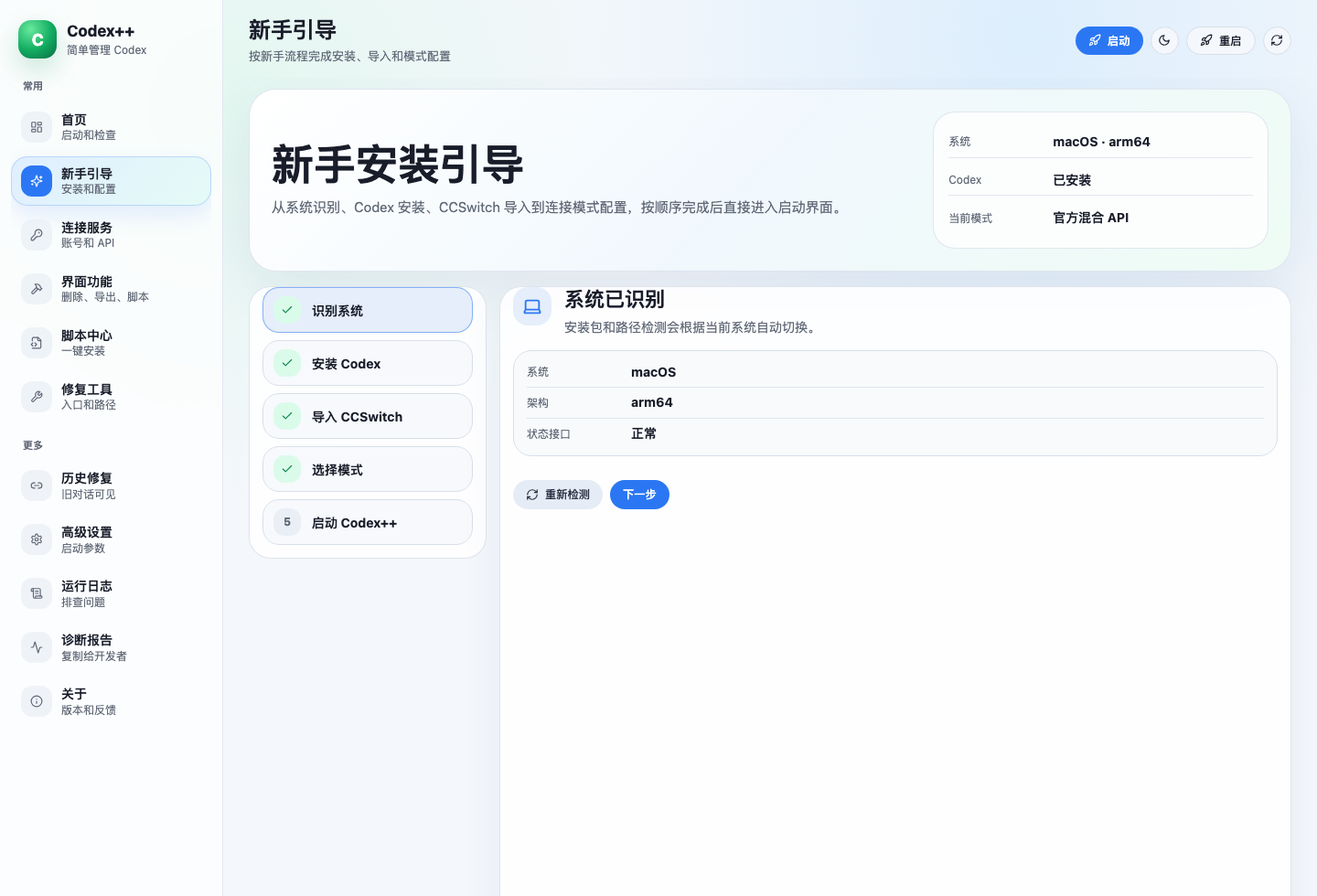
CodexTools beginner guide showing system detection, Codex install status, CCSwitch import, mode selection, and launch steps

Beginner guide

The guided flow checks platform and architecture, confirms Codex installation, imports CCSwitch providers, selects the connection mode, and ends at launch.

管理器界面截图

桌面管理器围绕日常操作组织:启动 Codex、确认连接模式、完成新手配置,并把页面增强能力放在可见位置,不需要手动找本地配置文件。

CodexTools 首页仪表盘,展示启动状态、连接模式、界面增强模式和修复入口

首页仪表盘

首页直接显示本地环境是否就绪,提供主要启动按钮,并把连接服务、界面功能、入口修复和关键状态集中到一个页面。

CodexTools 新手引导,展示系统识别、Codex 安装状态、CCSwitch 导入、模式选择和启动步骤

新手安装引导

新手流程按顺序完成系统识别、Codex 安装检查、CCSwitch 导入、连接模式选择和启动,降低第一次配置成本。

What is already built

The current project is more than a wrapper. It includes the desktop manager, first-run guide, connection mode management, page enhancements, script center, repair tools, diagnostics, and packaged downloads.

Current scope
Desktop packages

macOS and Windows downloads are published from this standalone repository, including installer-style and portable package options.

Guided setup

The beginner flow checks system status, detects Codex, imports CCSwitch providers, selects a connection mode, and ends at launch.

Connection modes

Official login, mixed API, and relay API workflows are managed from one screen with provider selection and connectivity checks.

Support tooling

Repair actions, provider sync, logs, and copyable diagnostics are built in so users can recover or ask for help with useful context.

目前已经做好的功能

当前项目不只是一个启动壳,已经包含桌面管理器、新手引导、连接模式管理、页面增强、脚本中心、修复工具、诊断报告和下载包发布。

当前范围
桌面下载包

macOS 和 Windows 下载包已经从这个独立仓库发布,包含安装包和便携包等使用方式。

新手引导

按顺序检查系统、识别 Codex、导入 CCSwitch 供应商、选择连接模式,并最终进入启动。

连接模式

官方登录、官方混合 API 和中转 API 都集中在一个界面里管理,支持供应商选择和连通性检查。

支持工具

内置修复动作、历史会话同步、日志和可复制诊断报告,方便用户恢复环境或带着有效信息求助。

Detailed feature layout

  • Home surfaceLaunch, inspect current status, and jump directly to the next repair action.
  • Connection managementConfigure official login, compatible APIs, relay profiles, protocols, and relay tests.
  • Enhancement controlsToggle UI enhancement capabilities and switch launch behavior by mode.
  • Script centerInstall, enable, disable, update, and remove user scripts from one place.
  • Repair and maintenanceFix entry paths, shortcuts, backend state, and other local setup issues.
  • Logs and diagnosticsExpose readable runtime logs and copyable diagnostics for support workflows.

功能详细布置

  • 首页启动面板直接启动、查看当前状态,并跳到下一步需要处理的修复动作。
  • 连接方式管理配置官方登录、兼容 API、中转配置、协议和连通性测试。
  • 增强功能控制统一管理增强功能,并按模式切换启动行为。
  • 脚本中心在同一处完成用户脚本安装、启用、禁用、更新和移除。
  • 修复与维护处理入口路径、快捷方式、后端状态和其他本地环境问题。
  • 日志与诊断提供可读日志和可复制诊断报告,方便排查和支持沟通。

Project philosophy

The reason for rebuilding this project is simple: I want more people to be able to use it. The original project created a useful foundation, but as the code, product direction, and community expectations evolved, there were differences in direction and some practical reasons to explore a separate branch.

CodexTools is that branch. It is built from my own thinking about the manager experience, while still respecting the open-source spirit that made this work possible in the first place. The goal is not to close the door behind one path, but to keep another path open for people who need a simpler, more accessible, and more actively shaped tool.

项目理念

重构这个项目的第一个原因,是希望让更多人真正用得上。原项目提供了有价值的基础,但随着代码、产品方向和社区需求变化,项目路线中也出现了一些分歧,以及一些现实层面的原因,所以我希望基于自己的想法继续重构,并发展出一个独立分支。

CodexTools 就是这个分支。它延续开源开放的精神,不是为了否定原项目,而是为了保留另一条可以继续探索的路径:让工具更容易安装、更容易理解,也更适合普通用户长期使用。

No sponsorship or donation

This project does not accept sponsorships or donations. It is maintained as an open, community-oriented open-source project, with the code and direction kept public for anyone who wants to study, use, discuss, or fork it.

This open-source project is linked with and recognized by the LINUX DO community: https://linux.do/

不接受赞助和捐助

本项目不接受任何赞助,也不接受捐助。它会以开放式开源项目的方式维护,代码和方向保持公开,欢迎使用、学习、讨论和继续分支发展。

我的开源项目已链接认可 LINUX DO 社区:https://linux.do/

Project origin and thanks

CodexTools is a standalone Go refactor and manager UI project based on the earlier Codex++ work. Thanks to the original Codex++ project for the foundation, workflow ideas, and user-facing tool direction.

项目来源与鸣谢

CodexTools 是基于早期 Codex++ 工作继续拆分出的独立 Go 重构和管理器界面项目。感谢原 Codex++ 项目提供的基础能力、工作流思路和面向用户的工具方向。

Telegram group QR code for https://t.me/wanai8

Telegram community

Join the user group for installation help, relay setup questions, and release follow-up.

https://t.me/wanai8

Telegram 交流群

用于安装协助、Relay 配置交流和版本更新跟进。

https://t.me/wanai8